
Every analytics team building on Snowflake has spent years accumulating structured data, building governed data pipelines, and scaling a warehouse to handle real business demands.
The next step is to make that data accessible to everyone on your team, including non-data team members.
That’s where Snowflake Intelligence comes in, giving every person on your team the ability to query data without writing a single line of SQL.
In today’s guide, we explore what Snowflake Intelligence does, how it compares to traditional BI, and what a more complete approach to self-serve analytics looks like.
What is Snowflake Intelligence?
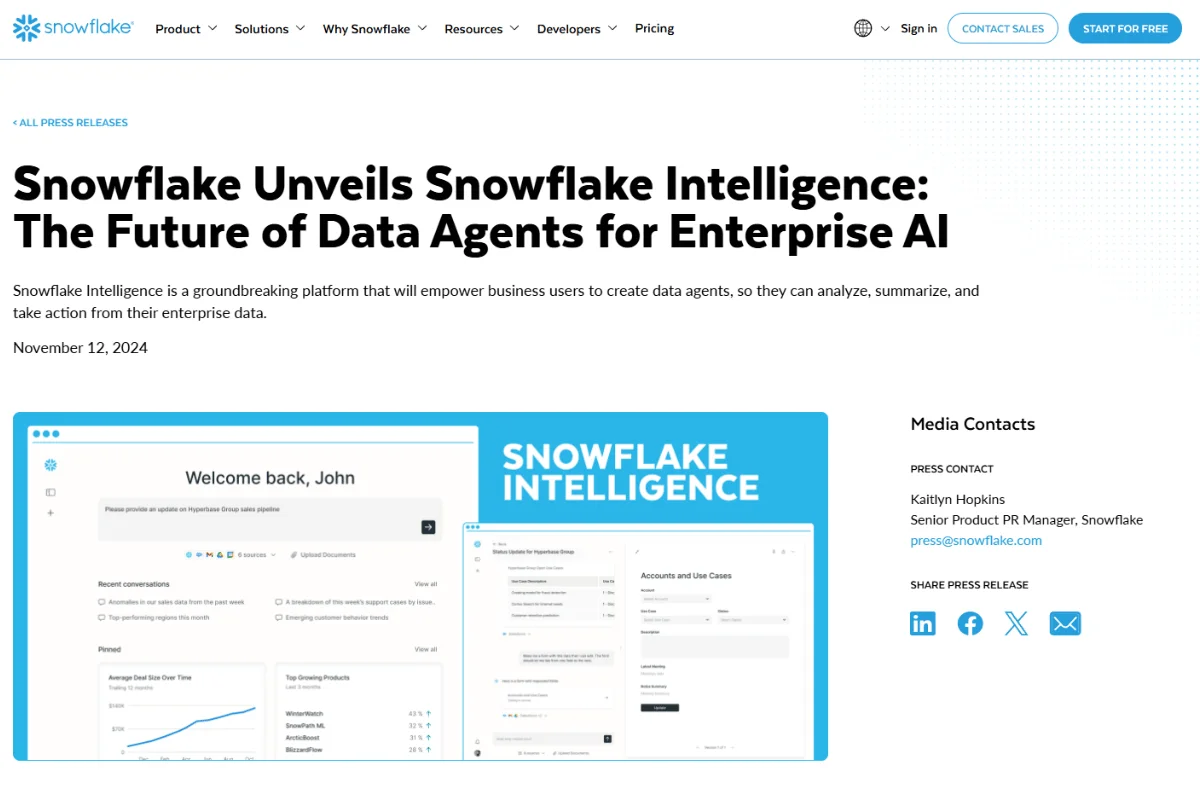
Snowflake Intelligence is an agentic AI layer built into the Snowflake Data Cloud, a platform that centralizes data storage, processing, and sharing within one governed environment.
Users can access Snowflake Intelligence at ai.snowflake.com, where business users ask questions in plain English and receive answers from both structured and unstructured data.
The tool relies on Cortex Analyst for SQL generation, Cortex Search for document retrieval, and Cortex Agents to orchestrate multi-step reasoning across these sources within Snowflake’s governed security perimeter.
Snowflake Intelligence vs. Traditional BI Tools
Since traditional BI tools and Snowflake Intelligence solve very different problems, here’s a side-by-side look to help you understand the shift:
- Data Scope: Traditional business intelligence only covers structured data. Snowflake Intelligence handles both structured tables and unstructured documents, such as call transcripts and PDFs.
- Query Method: Traditional BI depends on raw SQL and prebuilt dashboards, whereas Snowflake Intelligence uses Cortex Analyst to handle natural-language questions.
- Insight Depth: Traditional BI answers “what happened,” while Snowflake Intelligence can use multi-step analysis to explore “why it happened.”
- Setup Effort: Traditional BI requires curated dashboards maintained by your data team, while Snowflake Intelligence requires semantic views configured in Snowflake before users see value.
- User Access: Unlike traditional BI, which requires technical skills or support from data analysts, Snowflake Intelligence enables non-technical users to ask questions through conversational prompts.
The shift to conversational analytics is real, but the right question isn’t whether Snowflake Intelligence outperforms traditional BI. Your organization should ask whether the platform goes far enough.
Why Snowflake Intelligence Matters for Analytics Teams
Your data team is likely caught between ad hoc requests and strategic projects, so anything that relieves that pressure is worth considering.
Here’s why Snowflake’s artificial intelligence capabilities matter to your organization:
- Fewer Bottlenecks for Business Users: Your marketing leads and ops managers can ask a question in plain English and get a chart without a support ticket, which means fewer “quick questions” clogging your data team’s communication channels.
- Data Teams Shift to Strategic Work: When your analysts aren’t fielding basic queries about last week’s revenue, they can focus on forecasting and pipeline work that actually improves your data infrastructure.
- Faster Time to Insight: A question that used to take three days can get a response in seconds, if the semantic views are properly configured.
- Security Stays Intact: Snowflake Intelligence inherits your existing role-based access controls, so users can only see data you allow them to access.
The value you get depends largely on how well your team configures the platform upfront to maximize its capabilities.
Core Capabilities of Snowflake Intelligence
Knowing why Snowflake Intelligence matters is one thing, but knowing what it can do helps you identify where the gaps lie.
This is what you can experience with the platform:
- Natural Language to SQL (Cortex Analyst): You can type “Show me monthly revenue by product line,” and Cortex Analyst translates it into SQL, runs the query, and delivers results. The tool’s accuracy depends on how well your semantic views are defined, which means your data team bears that burden first.
- Document Search (Cortex Search): Your agents can pull answers from unstructured sources like PDFs and internal documents, then combine those insights with structured data in a single conversation.
- Multi-Step Reasoning (Cortex Agents): When a question requires data from multiple sources, Cortex Agents break the request into sub-tasks, select the right tools, and combine the results into a coherent answer.
- Workflow Triggers: You can configure agents to send alerts, update records, or kick off automated workflows based on the insights they surface.
- Semantic Views for Context: Cortex Analyst uses semantic views to define your business concepts and metrics. For example, this helps the AI distinguish between “gross profit” and “net profit” in your context.
These features are meant to shift the analytical burden away from your team. The shift is smoother once your data team has done the initial work of building semantic views and configuring data sources for business users to work from.
Snowflake Intelligence Architecture Overview
Understanding how Snowflake Intelligence is built can help you assess whether it simplifies your workflow or makes it more difficult to use and maintain.
Here’s what you need to know:
- Snowflake Cortex AI as the Foundation: Everything runs on Snowflake Cortex AI, which hosts the LLMs securely within Snowflake’s infrastructure. Your data and prompts never leave the governance boundary.
- Cortex Analyst for Structured Data: When you ask about your structured data, Cortex Analyst maps your query to SQL using semantic views, and the generated SQL runs under your existing security rules.
- Cortex Search for Unstructured Data: For document questions, Cortex Search uses retrieval-augmented generation (RAG) to find relevant content and feed it to the LLM.
- Cortex Agents as the Orchestrator: The agent layer routes your query to the right tool, planning and executing tasks in a single conversational flow.
- Compute Model and Cost: Each query consumes warehouse compute, with per-token charges for Cortex Analyst and index-based charges for Cortex Search. As with most other usage-based tools, costs can escalate quickly when you roll out access to hundreds of users.
The architecture is robust for mature Snowflake environments. But the self-serve analytics promise weakens when you realize how much configuration your data team still owns.
Snowflake Intelligence Use Cases
Your more pressing question is probably “what can my team do with it?”
Below are the main Snowflake for business intelligence use cases that provide the most value:
- Retail Demand Forecasting: Your supply chain lead can ask about projected demand and have Cortex Analyst query sales tables while the agent layers in signals from indexed market reports.
- Financial Performance Monitoring: Your CFO can ask, “Why did margins drop in Q4?” and have Snowflake Intelligence pull revenue data, map it against cost trends, and scan internal reports for context in one conversation.
- Customer Support Trend Analysis: Let’s say your support director wants to know which categories generate the most escalated tickets. The agent queries support data, cross-references product feedback documents, and surfaces patterns your dashboard could never show.
- Compliance and Audit Readiness: Your legal team can use Cortex Search to scan policy documents and Cortex Analyst to review access logs to confirm compliance with data policies.
Each use case works best when you’ve already built semantic views and indexed sources.

Is Snowflake Intelligence Right for Your Organization?
Snowflake Intelligence works well if you already run your entire data stack on Snowflake and have the engineering resources to build semantic views and manage compute costs.
But here’s the gap: Snowflake Intelligence is a feature of the Snowflake platform, not a standalone analytics agent.
As such, your business users still depend on your data team to set up semantic models, maintain them, and troubleshoot inaccurate queries.
The tool’s reasoning is not always surfaced in a way non-technical users can easily verify, which means trust becomes a recurring issue.
The real question is whether you want analytics inside your warehouse or analytics that sits on top of it, which is what the Zenlytic vs Snowflake debate ultimately comes down to.
How Zenlytic Takes a Different Approach
We built Zoë, our AI data analyst, to close the gaps presented by business intelligence tools. Zoë connects to your Snowflake warehouse (along with BigQuery, Databricks, and Redshift) and starts answering questions right away.
Here’s what makes our approach different:
- Zoë, Your Agentic Data Analyst: Zoë guides you through complex questions the way a skilled human analyst would. She combines follow-up prompts, plain-language summaries, and full transparency in her reasoning so you never have to guess where a number came from.
- Clarity Engine for Trust and Depth: Our Clarity Engine automatically brings together the depth of SQL with the governance of a semantic model. As your team asks questions, it learns your metric definitions and recommends updates to the semantic layer.
- Citations for Full Transparency: Through Citations, Zoë shows exactly which data sources, tables, and calculations produced every number, so your business users can verify the results independently.
- Memories for Consistent Answers: You lock in definitions with a single click, and Zoë gives the same answer every time with Memories.
- Clarity Admin for Governance: Our Dynamic Fields Admin Panel shows which concepts your users ask about and how often, capturing new metric requests automatically so your data team can review and promote the most valuable ones.
Our approach and results speak for themselves. The CTO of Stanley Black & Decker, Matt Griffiths, says:
“We already had a dozen tools that could tell us our sales last week. But only Zenlytic can answer the questions dashboards can’t. Zoë handles those high-impact questions that would be impossible to ask in traditional data platforms.”
Teams that choose Zenlytic often find that AI layered on top of warehouse features doesn’t fully address trust and explainability concerns that purpose-built analytics agents address from the ground up.
Book a free demo today to see Zoë in action.

Frequently Asked Questions (FAQs)
Can Snowflake Intelligence Replace Existing BI Tools Completely?
Snowflake Intelligence can’t replace existing BI tools in most cases. The platform adds a conversational AI layer on top of your Snowflake business intelligence environment, but it doesn’t replace dashboards or reporting tools.
Your organization may still need traditional BI for scheduled reports, board decks, and formatted exports, meaning you can use Snowflake Intelligence as a complement.
How Much Does Snowflake Intelligence Cost?
There’s no separate license fee. You pay through compute consumption. Cortex Analyst charges per token, while Cortex Search charges by index size, and warehouse charges scale with query volume.
Costs add up quickly with many users, which means you need to monitor consumption closely.
How Secure is Snowflake Intelligence for Sensitive Data?
Your data stays within Snowflake’s governance perimeter. The LLMs run inside Snowflake’s infrastructure by default, so prompts and metadata never leave the boundary.
Snowflake Intelligence inherits your role-based access controls, dynamic data masking, and row-level security.
What Data Sources Can Be Used With Snowflake Intelligence?
Snowflake Cortex AI works with structured data in Snowflake tables through Cortex Analyst and with unstructured data such as PDFs and other documents through Cortex Search.
You can connect external sources through custom tools, though your data team will need to configure those pipelines manually.
Conclusion
Snowflake Intelligence provides your team with a clear path away from static dashboards, and Cortex Analyst, Cortex Search, and Cortex Agents together deliver real value.
But the dependence on intensive upfront semantic modeling, the lack of built-in explainability, and the potential for runaway compute costs leave gaps.
Zoë fills those gaps with the Clarity Engine for automatic trust, Citations for full data lineage, and Memories for consistent answers every time. Your team gets from question to confident decision in seconds.
Discover what Zoë can do for your team. Book a demo today.