


.jpg)

Most data teams live in a cycle where a business user asks a question, the team queues it, and the answer shows up 3 days later.
Your warehouse already holds the data, but nobody on the business side can reach it without SQL skills or a support ticket.
Snowflake Cortex promises to fix problems like these with AI that runs inside your warehouse.
Here's a full breakdown of what Snowflake Cortex offers, how it compares, and where purpose-built analytics agents close the gaps.
What is Snowflake Cortex and Why It Matters
Snowflake Cortex is Snowflake's suite of AI and machine learning services that run natively inside the Snowflake Data Cloud.
You can access large language models, analyze text, generate embeddings, and build AI-powered apps while your data stays inside Snowflake's governed environment.
Your engineers and analysts can call Snowflake Cortex LLM functions from SQL to handle unstructured text right alongside structured tables.
Business users can ask data questions in natural language through Cortex Analyst, and your developers can build agents that combine multiple data sources in one answer.
The core value is that you get AI where your data already lives, so your team skips the complexity and risk of external AI services.
Snowflake Cortex AI Architecture
The value your team gets from Snowflake Cortex depends on the components underneath and how well your engineers configure them.
Here are the key pieces that work together:
- Cortex AI Functions: Every AI capability runs as a SQL-callable function. You can invoke models to classify, summarize, translate, and embed data directly in your queries, with no external API calls.
- Cortex Analyst: Snowflake's Cortex Analyst converts natural language questions into SQL through the semantic views your data team defines. Your results are only as accurate as those views, which means the setup effort falls on your engineers first.
- Cortex Agents: The Snowflake Cortex agent layer orchestrates multi-step questions that pull from both structured and unstructured sources. Agents plan subtasks, pick the right tool, and combine results into one response.
- Cortex Search: Your teams can comb through PDFs, transcripts, and documents using retrieval-augmented generation. Cortex Search indexes your unstructured sources and feeds relevant context to the LLM.
- Hosted Model Catalog: Snowflake hosts models from OpenAI, Anthropic, Meta, Mistral, and DeepSeek natively. You choose the best option based on cost, speed, and capability without your data leaving the governance perimeter.
Snowflake Cortex Features
With the architecture in place, here's what your team can actually use day to day.
These Snowflake Cortex AI features cover both pre-built functions and customizable tools:
- AI_COMPLETE: Run open-ended prompts against any hosted LLM in SQL. Your team can generate summaries, draft content, or extract insights from free-text columns in your warehouse.
- AI_CLASSIFY and AI_EXTRACT: These Snowflake Cortex AI functions sort text or images into categories you define and pull structured data from unstructured fields, all from SQL or Python.
- AI_TRANSLATE and AI_SIMILARITY: These enable you to translate text between languages and compute similarity scores between inputs. They open up multilingual and semantic search workflows inside your warehouse.
- AI_REDACT: Your compliance team can detect and remove personally identifiable data from unstructured text, with the LLM handling full and partial matches.
- Cortex Fine-Tuning: You can adapt a hosted model to your domain vocabulary to ensure that outputs match how your team talks about your data.
Most of these functions need your engineers to configure semantic views and manage compute before business users see reliable results.
Snowflake Cortex AI Capabilities and Use Cases
You need a complete Snowflake Cortex overview that goes beyond the feature list to the problems your teams can actually solve.
Here are the main use cases where the platform delivers real value:
- Customer Support Triage: Your support team can auto-classify tickets by category, sentiment, and urgency, then route them to the right queue without manual effort.
- Financial Performance Analysis: Your CFO can ask, "Why did margins drop in Q4?" and have Cortex pull revenue data, map it against cost trends, and scan internal documents for context.
- Retail Demand Forecasting: Your supply chain team can ask about projected demand while Cortex Analyst queries sales data and agents layer in signals from indexed market reports.
- Compliance and Audit Prep: Your legal team can scan policy documents with Cortex Search while Cortex Analyst reviews access logs for policy adherence.

Snowflake Cortex Pricing
Cortex doesn't carry a separate license fee, but the costs stack up across multiple layers, and your finance team needs to watch them closely.
- Per-Token Charges: Every call to a Cortex AI function costs credits based on the token count. Premium Snowflake Cortex models like Claude-4-Opus cost 12 credits per million tokens, while smaller models cost a fraction of a credit per million tokens.
- Serving Compute for Search: Cortex Search charges you per gigabyte of indexed data each month. A 100GB index can cost roughly 630 credits monthly regardless of search volume.
- Warehouse Compute: Standard warehouse rates apply to every query Cortex Analyst runs against your tables.
Token costs behave very differently from warehouse costs, so your team will want close monitoring as you scale access across the company.
Snowflake Cortex vs. Alternative AI Data Platforms
Snowflake Cortex is one way to put AI to work on your data. There are plenty of other options.
Here's a quick comparison across the major platforms:
Zenlytic (Zoë) vs. Snowflake Cortex
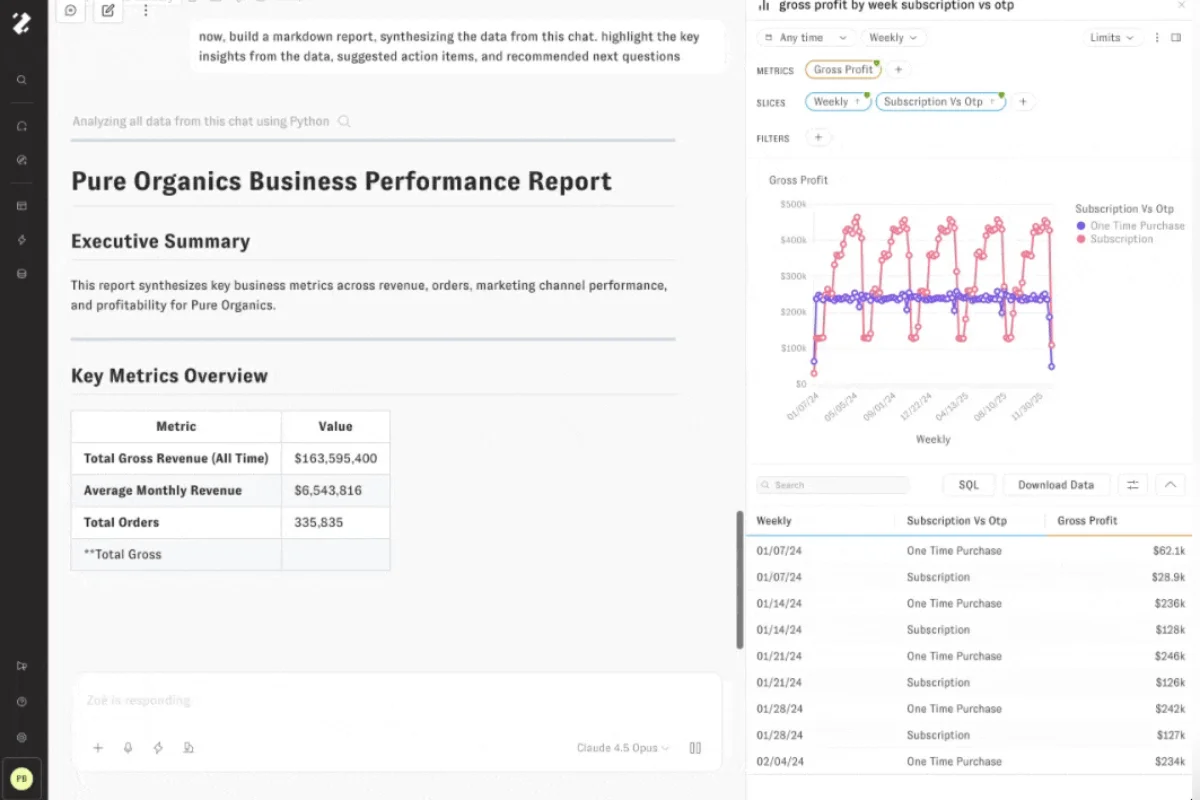
Zenlytic is a purpose-built analytics agent that gives your entire team trusted answers in natural language. Zenlytic's AI data analytics agent, Zoë, connects to Snowflake, BigQuery, Databricks, or Redshift and starts answering questions without weeks of semantic view setup.
Here’s how the two platforms compare:
- Setup Effort: Cortex requires your team to build semantic views before business users see value. Zoë's semantic layer auto-builds as your team asks questions, so you get answers on day one.
- Explainability: Cortex shows you answers, but your non-data team members can't verify them easily. Zoë cites full data lineage and breaks every answer into plain-language metrics anyone can verify.
- Consistency in Answers: Cortex often gives different answers to the same question on different days. Zoë's Memories locks in your definitions with one click, ensuring every user gets the same trusted answer.
Zenlytic brings real results. Matt Griffiths, CTO of Stanley Black & Decker, shared his experience:
"We already had a dozen tools that could tell us our sales last week. But only Zenlytic can answer the questions dashboards can't. Zoë handles those high-impact questions that would be impossible to ask in traditional data platforms."
Teams that adopt purpose-built analytics agents now, while the category is still in its early-adopter phase, gain a meaningful head start as AI in business intelligence reshapes how every team works with data.
Your team deserves analytics that earn trust from the first question. Here's what you get:
- Zoë: The AI analytics agent answers complex questions in natural language and explains every step of her reasoning. You never guess where a number came from.
- Citations: Every metric shows exactly which sources, tables, and calculations produced the number.
- Memories: You can lock in a definition once, and Zoë delivers the same answer to a repeat question across every user on your team.
- Patterns: Zenlytic’s Patterns indexes your real analytical knowledge, from existing SQL queries and BI dashboards to notebook logic and dbt models. The indexing helps Zoë learn how your team actually uses data and enables it to start delivering accurate results in minutes instead of months.
- Clarity Engine: This feature combines SQL depth with semantic-layer governance to deliver answers that are both powerful and verifiable.
Book a free demo today to see what Zoë can do for your team.
Databricks AI Genie vs. Snowflake Cortex
Databricks AI Genie converts natural language to SQL inside the Databricks Lakehouse, relying on Unity Catalog for governance.
Let’s see how the two platforms compare:
- Warehouse Lock-In: Like Cortex, Genie only works with its native platform. You can't query Snowflake or BigQuery data through it without external customization.
- Explainability: Genie shows the SQL but offers limited plain-language context for your business users.
ThoughtSpot vs. Snowflake Cortex
ThoughtSpot uses keyword-style search to deliver visual analytics. ThoughtSpot Spotter, its AI layer, adds LLM capabilities on top of that search model.
- AI Approach: Search accuracy depends on extensive data modeling and synonym management that your team handles upfront.
- Warehouse Support: ThoughtSpot connects to multiple warehouses, while Cortex locks you into Snowflake.
Tableau and Power BI vs. Snowflake Cortex
Tableau and Power BI are legacy BI tools with AI features layered on top of their dashboard-first experiences. When you compare Snowflake Cortex to these two, the self-service vs traditional BI gap is clear:
- AI Approach: Both Tableau and Power BI require you to build and maintain dashboards before AI copilots can reference them.
- Depth of Answers: Tableau and Power BI surface what's already in your dashboards, which means your team can't ask follow-up questions or explore the “why” without requesting a new report. Snowflake Cortex attempts multi-step reasoning across structured and unstructured sources in one conversation.
The pattern across these platforms, apart from Zenlytic, is the same: each adds AI to an existing environment without fully solving for trust.
Common Challenges and How to Overcome Them
Even with the right platform, your team will likely run into a few friction points.
Here's how to handle the most common ones:
- Maintaining Semantic View: Your business evolves faster than your data models, leading to inconsistencies. Assign a dedicated owner on your data team to audit and update semantic views at least monthly to keep Cortex Analyst accurate.
- Trust Gaps With Business Users: Your business teams won't adopt a tool they can't verify. Encourage your data team to document metric definitions in semantic views. You should also consider platforms that explain results in plain language to support adoption.
- Runaway Compute Costs: Token-based charges can spiral out of control when you open access to a broad user base. It's advisable to set up usage alerts through Snowflake's account views and use smaller models as the default option for routine tasks.
Frequently Asked Questions (FAQs)
Let’s end today’s discussion with answers to the most common questions about Snowflake Cortex.
Does Snowflake Cortex AI Require Separate Infrastructure?
No. Snowflake Cortex runs entirely inside your existing Snowflake environment.
You don't need to provide separate servers, manage GPU clusters, or route data to external endpoints. All LLMs and AI functions execute within Snowflake's compute layer, and you pay for them through your standard credit model.
Can Snowflake Cortex Support Multilingual Data Environments?
Yes. You can use the AI_TRANSLATE function to convert text between languages directly in SQL. AI_EMBED and AI_SIMILARITY also work across languages, so your team can run semantic search and classification on multilingual datasets without a separate pipeline.
How Does Cortex Handle Data Security and Governance?
Your data never leaves Snowflake's governance perimeter. Cortex inherits your role-based access controls, dynamic data masking, and row-level security.
You can also restrict model access through an account-level allowlist to ensure your team controls exactly which LLMs are available.
What Metrics Define Snowflake Cortex Success?
Your team should track metrics such as token consumption per query, cost per user, answer accuracy rates (measured against known benchmarks), and adoption across your business users.
Snowflake provides the CORTEX_FUNCTIONS_USAGE_HISTORY view for cost monitoring, and you can pair it with user feedback loops to measure trust over time.
Conclusion
Snowflake Cortex gives your team a real path from static dashboards to AI-powered analytics, and Cortex Analyst, Cortex Search, and Cortex Agents together deliver genuine value for mature Snowflake environments.
But a heavy semantic view setup, limited explainability for business users, and unpredictable compute costs leave gaps that your team will feel.
Zoë fills those gaps with the Clarity Engine for verifiable depth, Citations for full data lineage, and Memories for consistent answers across every user.
