


.jpg)

If you are a Chief Data Officer or VP of Data, you've watched data analysts focus more on generating reports while more important projects stall and collect dust.
You've also tried AI platforms that promise self-serve analytics but deliver black-box answers no one on the data team can trust. Solutions like Databricks Genie claim to address these challenges.
So, how does Databricks Genie enhance AI and BI workflows?
In this article, we'll explore how it improves data analytics, examine what makes it work, and compare it to purpose-built analytics agents that solve the trust problem differently.
What is Databricks Genie AI and Why It Matters
Databricks positions Genie as an AI-powered analytics assistant that lives inside the Databricks data intelligence platform.
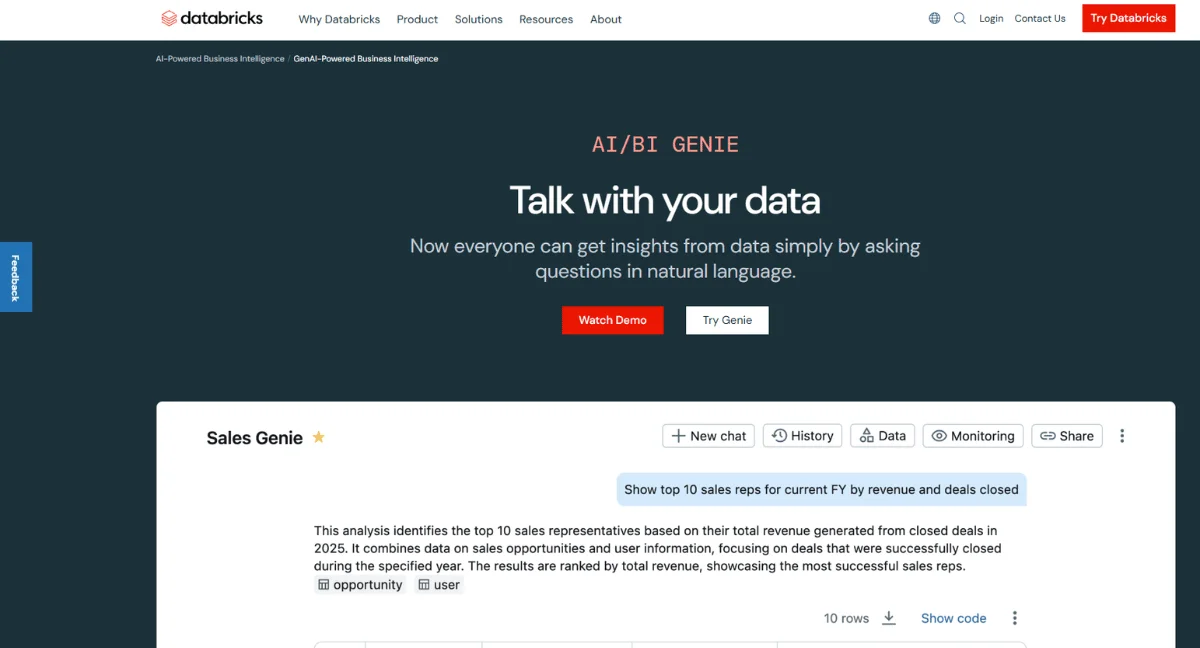
The tool converts natural-language questions into SQL queries, generates visualizations, and helps business users to access insights without writing code.
Organizations find Genie useful because it addresses a fundamental problem: Most employees can't query databases directly. This makes them dependent on data teams for answers, which creates bottlenecks and slows decision velocity.
How Genie AI Solves This Issue:
The system uses large language models to interpret questions, understand your data structure using the Unity Catalog metadata, and generate appropriate queries.
Users type questions in plain English, and Genie returns charts, tables, or raw data.
The appeal is straightforward. Business users get faster access to data, and data teams spend less time on repetitive requests.
Organizations that use Genie report improved data democratization and reduced time-to-insight for common analytical tasks.
How Databricks Genie Improves AI Workflows
AI teams need reliable data pipelines and quick experimentation cycles.
Genie makes several parts of this process easier, though it works best for specific use cases like:
Faster Feature Engineering
Data scientists can query datasets conversationally to understand feature distributions and identify patterns.
Instead of writing exploratory SQL, teams ask questions like "show me customer segments by purchase frequency" and get immediate results.
Simplified Data Exploration
Non-data teams spend significant time understanding and exploring data with the help of the data team.
Genie reduces this friction by letting users probe data characteristics through natural language, which accelerates learning and turns business teams into data-driven decision-makers.
Automated Data Profiling
The tool generates summary statistics and distributions automatically. Both data and non-data teams can quickly access quality data for various functions without intensive technical input.
Integration with MLflow
Genie connects to Databricks' machine learning lifecycle platform. Teams can query experiment results, compare model performance, and analyze data using conversational queries alongside their existing ML workflows.
The limitations become apparent in complex scenarios. Genie works well for straightforward analytical questions but struggles with multi-step reasoning or questions that require deep business context.
WhipsAndMarkovChains notes Genie’s context issues in a Reddit discussion:
“By default, the Genie LLM cannot see your row-level data. So let’s say you have a column called state and you ask it to write a query to retrieve all the data from Vermont. The LLM will probably assume the state column stores Vermont as the two-letter abbreviation VT. If you store states as the full name VERMONT, though, then Genie won’t know that, and it’ll produce a bad query. There’s a feature where you can allow Genie to sample row-level data so it can produce more accurate queries. Or you can provide that context in the Genie instructions to help guide it.”
How Databricks Genie Enhances BI Workflows
Business intelligence teams face constant pressure to deliver insights faster while maintaining data accuracy.
Genie offers several workflow improvements that help BI practitioners serve their organizations more effectively:
- Reduced Report Backlog: Business users can generate standard reports themselves, without waiting for analysts to be available. Questions about revenue trends, customer metrics, or operational KPIs get answered in seconds rather than days.
- Ad Hoc Query Handling: The majority of BI requests are one-off questions that don't warrant dedicated dashboards. Genie handles these efficiently by enabling stakeholders to access basic self-serve analytics for business intelligence.
- Validating Data Faster: BI teams need to verify data accuracy regularly. Genie speeds up validation checks by making it easy to spot-check metrics, compare numbers across sources, and investigate anomalies.
- Augmenting Data Dashboards: Users can ask follow-up questions about dashboard data without creating new visualizations. For example, someone viewing a sales dashboard can immediately drill into regional performance or specific product lines through conversational queries.
- Governed Data Access: Unity Catalog integration ensures that users only see data they're authorized to access. Security policies apply automatically to all Genie queries, which helps maintain governance standards while enabling self-serve analytics.
The problem is that Genie inherits issues from its architecture. The tool is excellent at answering questions that map cleanly to your existing data model, but struggles when users need to explore beyond predefined structures.
Your BI teams will still need traditional dashboards for monitoring, and Genie works best as a complement rather than a replacement tool.

Key Business Benefits of Using Databricks Genie
Organizations that deploy Genie successfully see measurable improvements across several dimensions. The benefits vary based on company size, data maturity, and implementation approach.
Some of them include:
- Time Savings for Data Teams: Data analysts spend less time on routine requests. The extra capacity goes to higher-value work, such as building predictive models, designing experiments, or optimizing data pipelines.
- Improved Decision-Making Speed: Business leaders can answer questions in real time during meetings instead of scheduling follow-up sessions after analysts pull reports. This accelerates decision cycles and helps teams move faster on opportunities.
- Lower Barrier to Entry: Non-technical employees can access insights without learning SQL or the interfaces of BI tools. Marketing managers, product owners, and operations leads become more data-driven when they can ask questions naturally using a conversational interface.
- Cost Efficiency: Reducing analyst workload means companies can scale data access without proportionally scaling headcount, which means they get more value from existing team members.
- Increased Data Usage: More employees engage with data when the interface is conversational. Insights that would have gone undiscovered emerge when business users can explore data independently.
How Databricks Genie Compares to Other Tools
Genie sits in a growing category of AI-powered analytics tools, each with its own strengths and shortcomings.
Understanding how these solutions differ can help you choose the right tool and approach for your needs.
Architecture Philosophy
Genie layers AI capabilities on top of existing BI infrastructure.
The tool works within Databricks' ecosystem and leverages Unity Catalog for metadata. This approach delivers quick wins but inherits limitations from the underlying BI paradigm.
Purpose-built analytics agents take a different path.
Zenlytic has designed an analytics platform to solve the trust and depth problems that plague AI-powered analytics.
The Trust Problem and Failure of AI on Top of BI
Most AI analytics tools, including Genie, struggle with explainability and consistency, yet consistency is more important than intelligence in data analytics.
Business users can't verify answers, which creates a verification bottleneck where people ask data teams to check the AI's work. This defeats the purpose of self-serve analytics.
Zenlytic took a different approach.
Instead of adding AI to legacy BI, Zenlytic built an analytics agent from the ground up to solve the trust problem through several interconnected features.
The company was named to The Leading 100 for 2024, which honors innovative technology startups that drive the future of brand-to-consumer business systems.
Zenlytic does this through powerful, accessible technology solutions for tech-enabled companies.
Here's how Zenlytic's Zoë delivers trustworthy analytics:
- Memories: You can lock in exact assumptions and methodologies with one click. When someone asks about "Latin America sales”, Zoë, Zenlytic’s AI data analytics, gives the same answer every time since the definition is locked in memory.
- Citations: Every metric comes with full data lineage. Users see exactly which tables and calculations produced each number, which builds confidence in the results.
- Clarity Engine: Zenlytic's foundation decompiles complex SQL into understandable business metrics. Non-technical users can verify that the analysis matches their intent without reading or understanding code.
- Depth of Analysis: Legacy BI tools with AI layered on top can only answer questions that fit their predefined data models. Zoë handles the complex, multi-step questions that drive actual business decisions.
- Consistency Across Users: When five people ask similar questions, they get consistent answers because Zoë learns and applies the same logic automatically. This eliminates the chaos of different team members working with conflicting numbers.
- Explainability That Builds Trust: Zoë doesn't just return numbers. The platform shows reasoning, explains calculations, and makes every step transparent. Users understand what they're looking at, which is critical for making confident decisions.
Companies choosing Zenlytic today are early adopters. After trying the AI-on-BI approach with tools like Databricks Genie or Microsoft Copilot, they understand the limitations. They're ready for purpose-built analytics agents.
The curve is shifting. As 'analytics agent' becomes industry standard terminology, more organizations are moving from legacy BI with AI bolted on to platforms designed for exploratory analytics from the ground up.
Book a demo today to see how Zoë delivers trustworthy analytics that accelerate decision-making velocity.

Best Practices for Successful BI Workflow Enhancement
Implementing AI-powered analytics requires thoughtful planning beyond just technical deployment. To succeed, you need to focus on adoption, governance, and continuous improvement.
Let's see what you need to do:
Start with High-Volume Use Cases
Identify the most common analytical questions your organization asks often. Apply AI tools to these scenarios first to gain quick value and make users more confident in the tool.
Ensure Clear Governance
Define which data sources the AI can access, set up proper access controls, and create review processes for business-critical analyses.
Train Users Gradually
Roll out access in phases, starting with power users who can provide feedback. Document common question patterns and best practices to help others learn effective prompting strategies.
Monitor Query Quality
Review the questions users ask and the answers they receive. Doing this will help you identify patterns where the system struggles and refine your data model or semantic layer to improve accuracy.
Measure Actual Impact
Track metrics like time-to-insight, data analyst workload, and business user satisfaction. Real usage data helps you optimize deployment and prove ROI to stakeholders.
Here are some extra tips on using Genie AI from Reddit user Puzzleheaded-Sea4885:
“A couple of things for a good genie experience:
- Enrich your metadata (column comments, tags, etc., in UC)
- Instructions in the genie config
- sample queries in genie config
- Extra credit for UC metric views.
These things aren’t needed, but it can really enhance the experience for non-technical users.”
If you're starting with legacy BI infrastructure and layering AI on top, these best practices only get you so far.
The architecture matters more than implementation. Purpose-built AI analytics agents don't require the same governance overhead because trust and explainability are built into the foundation.
Challenges and Considerations Before Implementation
Instead of working with a legacy BI tool that layers AI on top, you'll be better off using a dedicated AI-powered analytics tool.
AI-driven analytics delivers significant benefits but also introduces new complexities that teams must address proactively.
Ensure you look out for and address the following issues:
- Data Quality Requirements: AI tools amplify data quality issues. If you have inconsistent definitions, missing values, or poorly structured tables, the AI will give unreliable answers. You need clean, well-organized data before using conversational analytics.
- Change Management: Business users accustomed to dashboards need training and support to adopt new workflows. You should expect an adoption curve where early success stories gradually convince skeptical staff members.
- Trust Building: Users won't use tools they don't trust. They need you to invest time to showcase the tool's accuracy, provide training, and create feedback systems so they can have more confidence in AI-generated insights.
- Integration Complexity: Connecting AI tools to existing data stacks requires technical work. Plan for data pipeline updates, security configuration, and ongoing maintenance.
- Cost Considerations: Cloud-based AI solutions incur compute costs that scale with usage. You'll have to budget for both licensing fees and infrastructure expenses, especially during initial high-exploration periods.

Frequently Asked Questions (FAQs)
Here are answers to common questions on Databricks Genie AI:
Can Genie AI Support Multilingual Queries?
Genie primarily supports English queries currently. While the underlying LLM technology can understand multiple languages, Databricks has optimized the tool for English-language business questions.
Organizations with multilingual teams should test query performance in their required languages before broad deployment.
What Data Formats Are Compatible with Genie AI?
Genie works with data stored in Databricks' Delta Lake format and can query structured data in your lakehouse.
The tool accesses tables registered in Unity Catalog, which means your data needs to be in formats that Databricks supports, including Parquet, CSV, JSON, and various database sources.
Does Genie AI Require Additional Licensing?
Genie is included with Databricks subscriptions but may have usage-based costs depending on your contract. Compute resources for query processing follow standard Databricks pricing models.
You should review your specific agreements to understand the cost implications.
Can Genie Generate Predictive Forecasts Automatically?
Genie focuses on descriptive and diagnostic analytics rather than predictive modelling.
The tool can query historical data and show trends, but it doesn't automatically build forecasting models.
Data science teams need to use Databricks' ML capabilities for predictive and proactive analytics.
Conclusion
Databricks Genie enhances AI and BI workflows by making data more accessible to business users through natural language queries.
With the tool, you can reduce analyst workload for routine requests, speed up decision cycles, and lower barriers to data access across organizations.
However, AI-on-BI solutions face inherent limitations around trust, consistency, and analytical depth.
Business teams need analytics agents that not only answer questions but also explain their reasoning, maintain consistent definitions, and handle the complex queries that drive real decisions.
Zenlytic solves these fundamental challenges. Zoë delivers accurate, consistent, and explainable analytics that business users actually trust.
The Clarity Engine ensures transparency, Memories locks in definitions, and Citations provides full data lineage for every result.
Experience analytics that accelerates decision velocity and builds trust across your organization. Schedule a Zenlytic demo today.
